TRY PRO FREE — 3 Days, No Credit Card

Your Network,
One Tap Away

GoPassy is a digital business card in your iPhone’s Apple Wallet. Turn your LinkedIn, portfolio, or any link into a QR code anyone can scan. No more fumbling with business cards.

Available on iPhone. Android is coming soon, with Google Wallet support. Join the Android beta

GoPassy app icon

Ellie Grant

Software Developer

From Link to Wallet in Three Steps

No printing, no app for the other person, and no spelling out your LinkedIn URL.

1

Create Your Pass

Add your name, a headline, and the link you want to share, like your LinkedIn profile or portfolio. GoPassy makes the QR code.

2

Add It to Apple Wallet

Tap “Add to Apple Wallet.” Your pass sits next to your boarding passes and tickets, and it works without a signal.

3

Get Scanned

Show your pass and anyone can scan it with their phone camera. With Pro, you get a notification every time it happens.

Made for students at career fairs, recruiting teams, and whole companies.

What GoPassy Looks Like on Your iPhone

Real screens from the app: make a pass, add it to Wallet, and know when someone scans it.

GoPassy Create Pass screen with a name, link and headline filled in and a QR code preview
Create your pass. Add your name, link, and headline, and GoPassy makes the QR code.
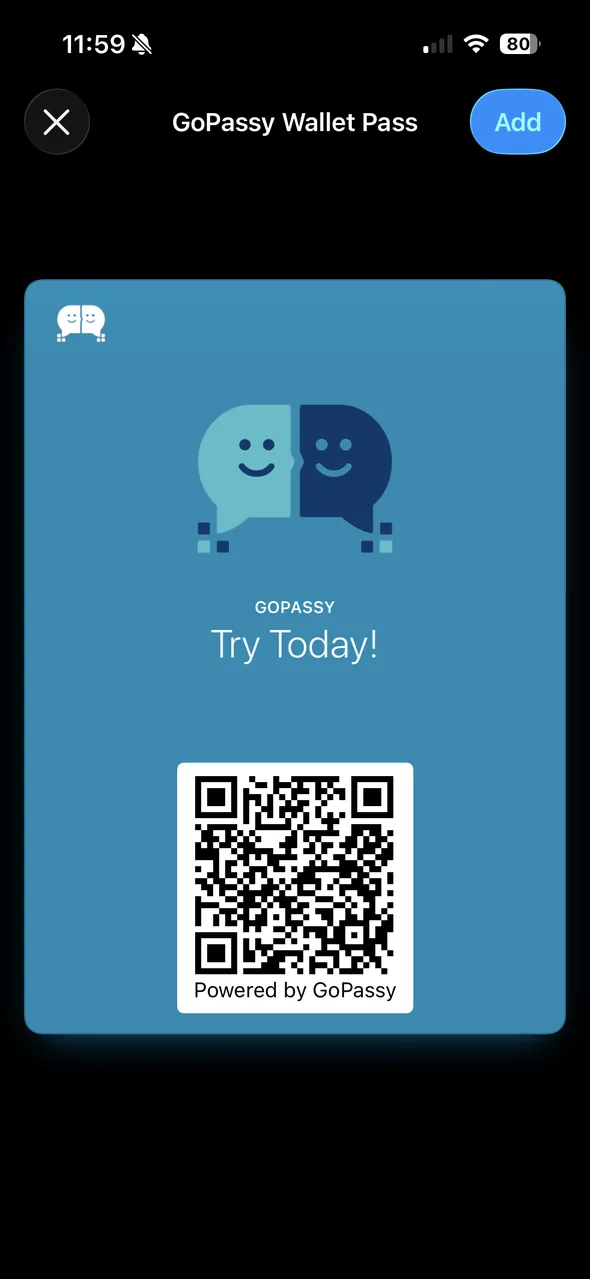
Apple Wallet’s Add Pass screen showing a GoPassy pass with a QR code
Add it to Apple Wallet. One tap, and it lives next to your tickets and boarding passes.
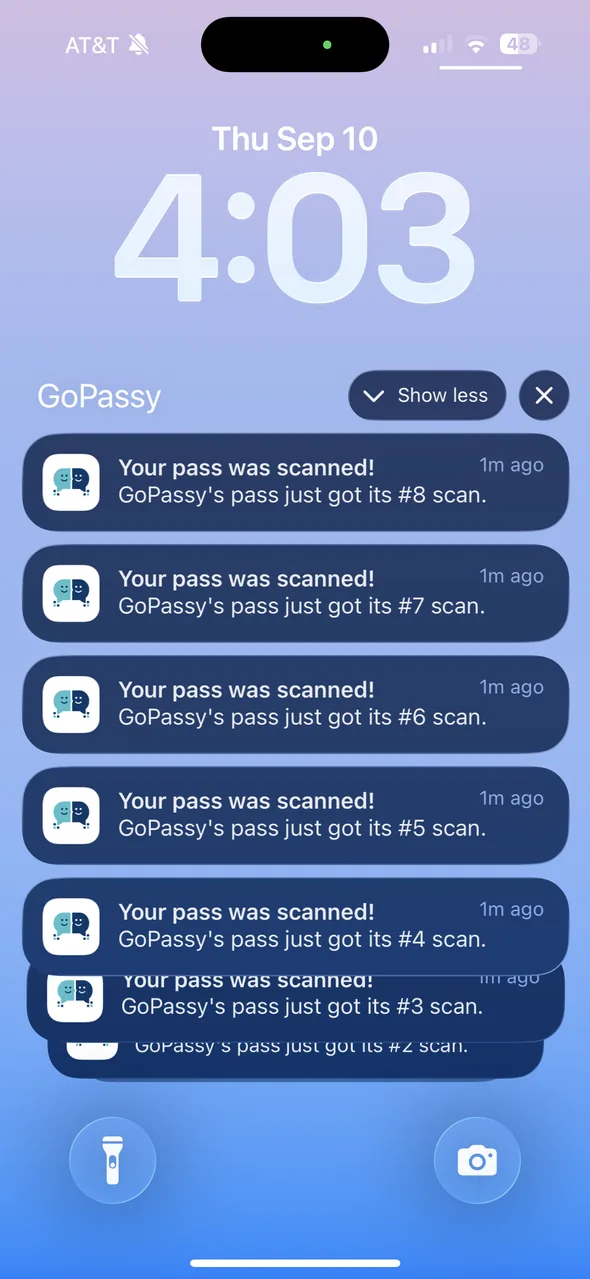
iPhone lock screen with a stack of GoPassy notifications saying the pass was scanned
Know when you’re scanned. Pro sends a notification every time someone scans your pass.
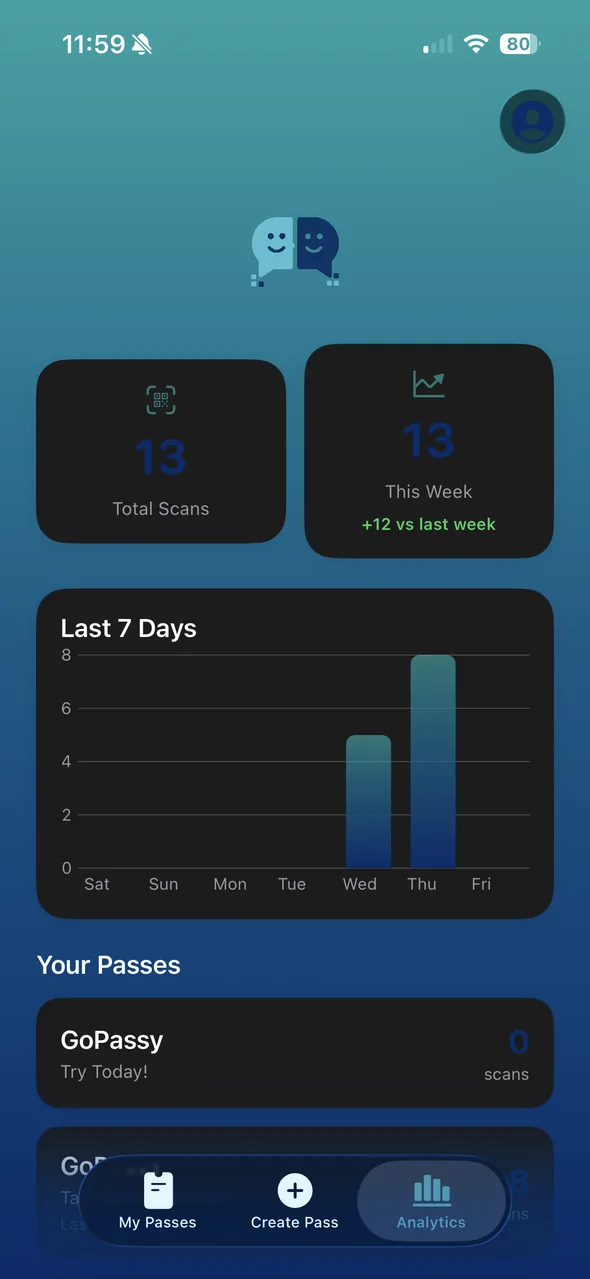
GoPassy Analytics screen showing total scans, scans this week, and a chart of the last 7 days
See your reach. Pro shows total scans, this week’s scans, and a daily chart.

Everything You Need to Network Smarter

GoPassy turns your phone into a professional networking powerhouse.

📱

Apple Wallet Integration

Generate .pkpass files and add your QR code pass directly to Apple Wallet for instant access anywhere.

Instant QR Codes

Turn any URL into a scannable QR code in seconds. LinkedIn, portfolio, website — you name it.

☁️

Cloud Synced

Your passes are stored securely in the cloud with Firebase. Access them on any device, anytime.

🔒

Secure by Default

Email verification, encrypted storage, and secure authentication protect your data at every step.

🎨

Beautiful Design

Sleek teal-and-navy interface with full dark mode support. Looks stunning on any iPhone or iPad.

👑

Pro Unlimited

Upgrade to Pro for unlimited passes. Free users get 3 passes to start — no credit card required.

Simple, Transparent Pricing

Start free. Upgrade when you're ready for more.

Free

$0 /forever
No credit card required
  • Up to 3 saved passes
  • QR code generation
  • Apple Wallet integration
  • Cloud sync with Firebase
  • Dark mode support
  • Unlimited passes
Get Started Free

Frequently Asked Questions

Got questions? We've got answers.

GoPassy is a digital business card app for iPhone. It turns your LinkedIn profile, portfolio, personal website, or any link into a QR code pass in Apple Wallet. Show the pass and anyone can scan it with their phone camera to open your link. It’s free to start, and Pro adds scan analytics, custom branding, and NFC tap-to-share.

GoPassy is free for up to 3 passes. GoPassy Pro is $4.99 a month or $39.99 a year and adds unlimited passes, custom colors and logos, QR scan analytics, and NFC tap-to-share. Team plans for companies start at $79 a month for 15 people.

Yes. In GoPassy, paste your LinkedIn profile link, add your name and headline, and tap “Add to Apple Wallet.” Your QR code then lives in Wallet next to your boarding passes and tickets, ready to show at any event.

No. Any phone camera, iPhone or Android, can scan a GoPassy QR code and open your link. Only you need the app.

GoPassy is on iPhone today, and GoPassy for Android, with Google Wallet support, is coming soon. People with Android phones can already scan your pass.

Yes. The QR code is stored inside your Wallet pass, so you can show it with no signal. The person scanning needs a connection to open your link.

Free accounts can save up to 3 passes. Each pass includes a name, headline, URL, and auto-generated QR code. If you need more than 3, you can upgrade to Pro for unlimited passes at $4.99/month.

After generating your QR code, simply tap the "Add to Apple Wallet" button below the preview. GoPassy generates a .pkpass file through our secure backend and adds it directly to your Wallet app.

Absolutely. You can cancel anytime through your iPhone's Settings > Apple ID > Subscriptions. Your Pro features will remain active until the end of your billing period. Your existing passes (even beyond the free limit of 3) will still be accessible, but you won't be able to create new ones beyond the free tier limit.

Yes. GoPassy uses Firebase Authentication with email verification and stores your passes in Firestore with per-user security rules. We don't store your QR code images — they're generated on-the-fly from your URLs. Your subscription status is verified through Apple's StoreKit 2 framework.

Check your spam or junk folder first. If it's not there, you can tap "Resend Email" on the verification screen in the app. If you're still having trouble, contact us at gopassyapp@gmail.com.

You can reach us through the Help & Support section in the app (Profile > Help & Support), or email us directly at gopassyapp@gmail.com. We typically respond within 24 hours.

No. GoPassy, spelled with a “y,” is a digital business card app for Apple Wallet made by an independent developer. It isn’t affiliated with the transit, travel, toll, or password apps named GoPass.

Built by a Networker, for Networkers

GoPassy started with a simple frustration and a big idea.

Pass Go? No. Pass on the Go.

GoPassy was born out of a real problem: networking events where you run out of business cards, fumble with phone contacts, or lose that one LinkedIn connection you really wanted to keep.

We built GoPassy to make professional networking as simple as opening your Apple Wallet. One tap, one scan, one connection. No paper waste, no lost contacts, no friction.

As a solo-built app, every feature in GoPassy was designed with care — from the teal-and-navy color palette to the seamless Apple Wallet integration. We're just getting started, and we'd love for you to be part of the journey.

Ellie Grant, founder of GoPassy
Ellie Grant
Founder & developer
  • Rowan University, Computing & Informatics, minor in Entrepreneurship
  • Former Carnegie Mellon IT Lab Summer Security Intensive Fellow
  • Leadership training specialist in operations

“I built GoPassy after too many career fairs where a great connection got lost.”

Connect on LinkedIn →